Posts

Showing posts with the label nginx

DOMPDF 內嵌圖片無法顯示的問題 pdf image background no show

Image
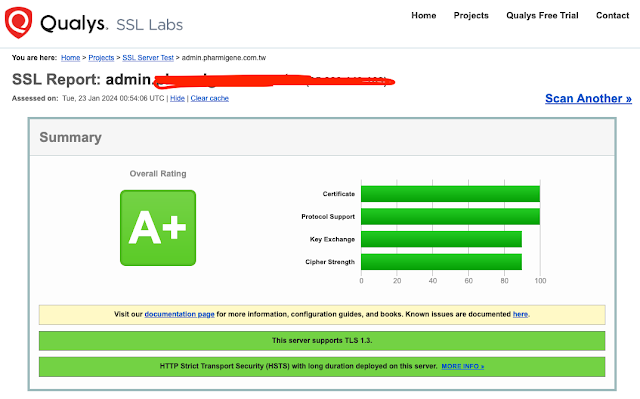
將測試站搬到正式站後(不同主機) 遇到由 dompdf 產生的 pdf 檔案內嵌圖片出不來的問題 圖片是用 img 跟 background 載入的 如果連結換成測試站的卻可以 比對兩邊 nginx 設定後才發現應該是 SSL 憑證的問題 測試站在 SSL Labs 拿到的是 A+ 等級 但正式站缺只有 B 後來修改 nginx 設定檔並將 ssl_certificate 設定正確的 .cer 檔案後 重啟 nginx 再次測試跑 SSL Labs 測試就拿到 A+ 喔 PS. 如果前後端分離的情狀下,主要修改的 API 站台,建議將所有站台一併更新至 A+

CentOS8 crash 之如何查詢 php-fpm 掛掉導致系統 crash 的查詢方式

Image
首先先搜尋 /var/log/message 裏面當機的原因 grep -i 'killed process' /var/log/messages 這篇主題主要是講述因 php-fpm 當掉的情形 php 當掉可以查詢的方向有: 1. php-fpm log 2. Nginx access or error log 可以從上述查詢到的時間點左右調查 這次的情況是某支 API 短時間內被大量的呼叫 剛好這支 API 又跑得比較慢 一時處理不及就炸了 順便也檢視一下 php-fpm 的設定 分享一下 `/etc/php-fpm.d/www.conf` 的設定 pm.max_children = 60 pm.start_servers = 5 pm.min_spare_servers = 5 pm.max_spare_servers = 35 pm.process_idle_timeout = 10s pm.max_requests = 500 其中參數該怎麼設定可以參考一下底下的 Reference 每個人講的似乎都不太一樣 可能要自己觀察看看怎樣比較適合自己 查詢 php 記憶體的平均使用量 ps --no-headers -o "rss,cmd" -C php-fpm | awk '{ sum+=$1 } END { printf ("%d%s\n", sum/NR/1024,"M") }' 檢查共有開啟多少個 php-fpm process ps -ylC php-fpm --sort:rss 另外建議也可以查看 `systemctl status php-fpm` 剛好有些 process 不應該卡很久的剛好看到 主機規格 Google Compute Engine 1 vCPU 5G RAM Nginx 1. php-fpm 7.4.23 Reference Finding which process was killed by Linux OOM killer Nginx 與 PHP-FPM 最佳化效能設定教學與技巧 php-fpm 效能優化 PHP-FPM 效能調校 on CentOS 7 Nginx 啟用 PHP-FPM 服務狀態監控網頁教學 Linux 用 ps...
使用 acme.sh 搭配 Let's encrypt 申請 wildcard ssl 憑證

Image
之前一直都是使用 certbot 套件 不過換到 CentOS 8 後 這個套件到今天(2020.05.28)為止還沒支援就是 由於 certbot 是用 pythlon 開發的 所以安裝時會安裝一堆相依的套件 這也是我一直不喜歡用 certbot 的原因 會間接搞亂我的環境 後來找到 acme.sh 是使用 shell script 撰寫的 相對來說單純很多 安裝也很簡單 這個範例是搭配 Cloudflare DNS 做設定 安裝 acme.sh 我是使用 root 執行安裝的 curl  https://get.acme.sh | sh 所以安裝完會出現 /root/.acme.sh 這個資料夾 取得 Cloudflare 的 key 登入你的 cloudflare 帳號後 到這個頁面  https://dash.cloudflare.com/profile/api-tokens 點選下方「Global API Key」右邊的 View 認證完後會取得一組 Key 申請 SSL 憑證 在 /root/ 下新增一個 ssl_cert.sh 檔案 其中 yourdomain.tld 為你自己的網域名稱,如 google.com 因為有指定目錄於 /etc/letsencrypt 中 所以憑證應該會出現在 /etc/letsencrypt/yourdomain.tld 下 由於是 wildcard 的關係,所以會指定兩個 domain 分別為 yourdomian.tld 及 *.yourdomain.tld 請注意,務必讓 yourdomain.tld 在第一個,如果讓 *.yourdomain.tld 在前面的話,你的資料夾就會是 *.yourdomain.tld export CF_Key="your global api key" export CF_Email="你的 cloudflare 登入的帳號(信箱)" /root/.acme.sh/acme.sh --issue -d yourdomain.tld -d *.yourdomain.tld --cert-home /etc/letsencrypt --keylength 2048 --dns dns_cf \ --reloadcmd "system...

Websocket error

Image
前端使用 React 開發 利用 restful API 來串接資料庫的部分 在本機開發的時候不會有 websocket 連接 但放到 server 上就會跑出來 而且會有 http error 400 的錯誤 妙的是 Connecting 居然是 Upgrade 網路上搜尋到分別有 Apache 跟 Nginx 的解法 我是參考 fuatsengul 說的這部分去做設定的 ServerName mysite.com ServerAlias www.mysite.com SSLEngine on SSLProxyEngine On ProxyRequests Off SSLCertificateFile /etc/apache2/ssl/mysite.com.crt SSLCertificateKeyFile /etc/apache2/ssl/mysite.com.key SSLCertificateChainFile /etc/apache2/ssl/ca.cer DocumentRoot /var/www/errorPages ErrorDocument 503 /503.html ProxyPass /503.html ! ProxyPass / http://localhost:3999/ ProxyPassReverse / http://localhost:3999/ RewriteEngine on RewriteCond %{HTTP:UPGRADE} ^WebSocket$ [NC] RewriteCond %{HTTP:CONNECTION} ^Upgrade$ [NC] RewriteRule .* ws://localhost:3999%{REQUEST_URI} [P] 主要是紅色區塊那部分 前面那兩行 ProxyPass & ProxyPassReverse 我本來就有加 主要是將 port 3000 導到 port 80 加上紅色區塊後(需要依照自己主機設定修改) 連線就正常了 如下圖